Prompt
The Prompt step is a more flexible alternative to Menu. It accepts single or multi-digit input (up to 20 digits) and can also listen for spoken words or phrases.
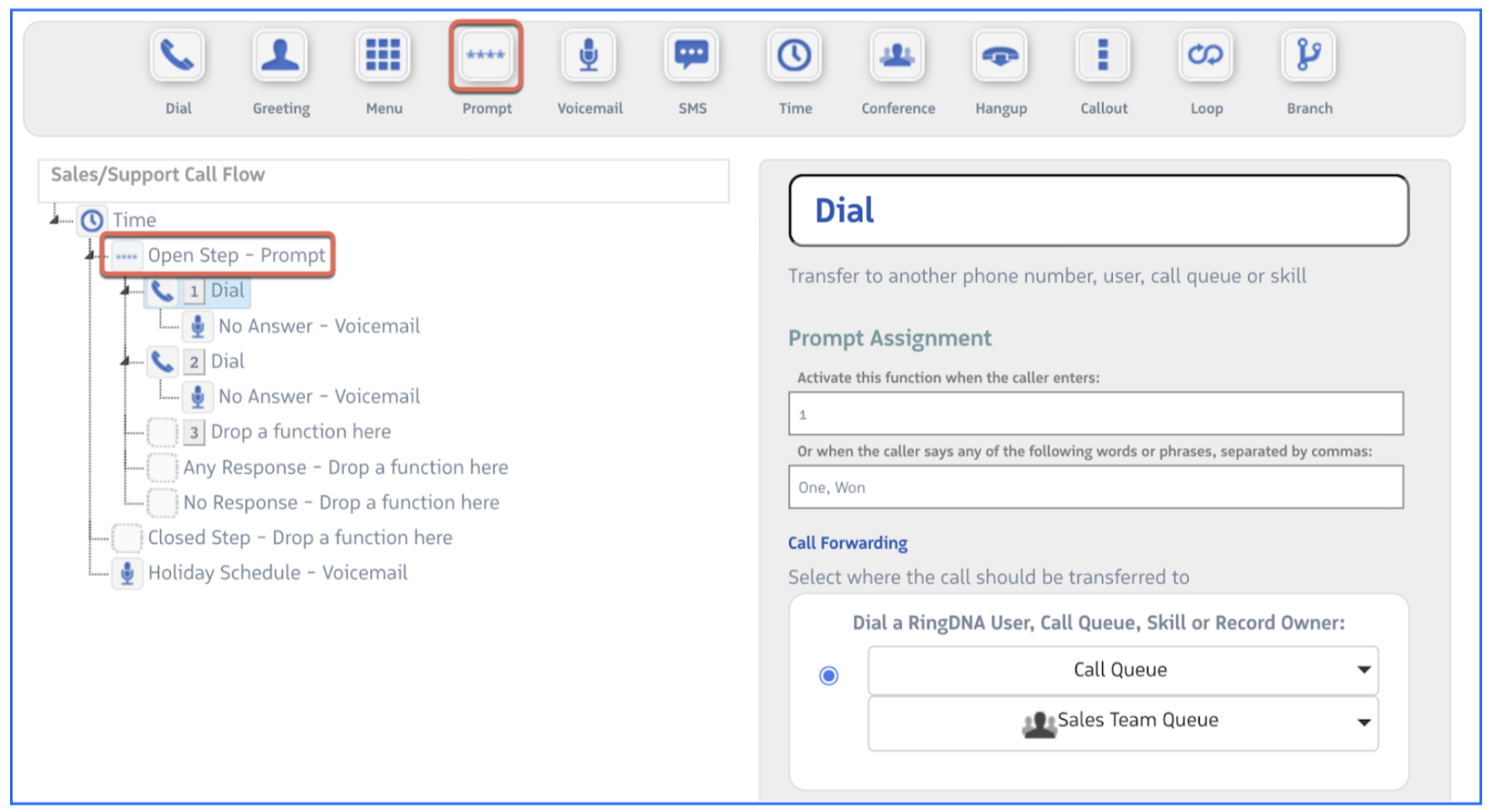
Key differences from Menu:
- Accepts multi-digit extensions (e.g.,
101,2215) - Accepts spoken words or phrases — add them to the Or when the caller says any of the following words or phrases, separated by commas field
- Any Response path catches any input not explicitly configured — overrides the Invalid Response audio
- No response path handles calls that time out with no input
Saving the caller’s input:
The Prompt step can store whatever the caller enters as a named variable using the Save Response — What key should be used to save the response? field. Enter a key name (e.g., memberId) and Revenue.io makes the caller’s input available as {{memberId}} in all subsequent steps. This is useful when you need the caller’s input to drive downstream logic — passing it to a Callout step for a Salesforce lookup, evaluating it in a Branch step, or including it in an SMS message.
See Call Flow Variables for more on using saved prompt responses.
Use Prompt when callers need to enter extensions, account numbers, or when you want to support both key-press and voice navigation.