Greeting
The Greeting step plays audio to the caller. Use it at any point in the flow — as a welcome message, a hold announcement, or a confirmation after collecting input.
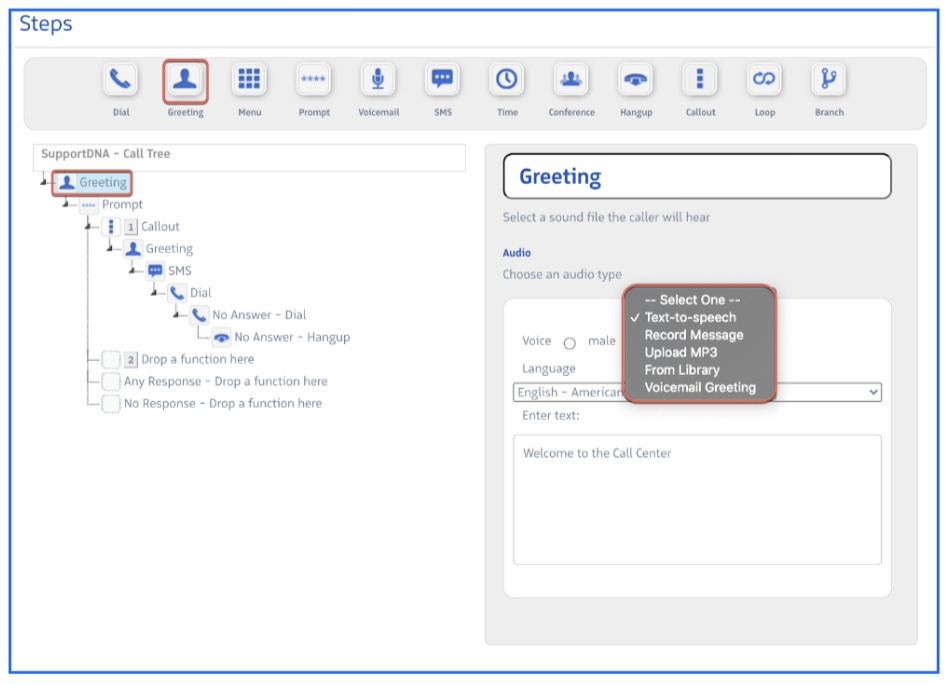
Audio source options:
| Option | Description |
|---|---|
| Text-to-Speech | Type a message and Revenue.io converts it to audio. Supports Female or Male voice in English (American/British), Spanish, French, and German. |
| Record Message | Enter your phone number and record a live greeting. |
| Upload MP3 | Upload an existing recording. |
| From Library | Select from previously uploaded recordings. |
| Voicemail Greeting | Use a saved voicemail greeting file. |
Announcing queue metrics:
When a Greeting step is placed immediately before a Dial step to a queue (with no other steps in between), it can announce real-time queue information using these variables in a Text-to-Speech message:
{{queue_average_wait_time}}— Estimated wait time in minutes, calculated as: (current calls in queue × avg call duration over 7 days) ÷ (available agents){{queue_size}}— Number of callers currently in queue
Both variables can be combined in the same greeting. For example: “Your wait time is approximately {{queue_average_wait_time}} minutes. There are {{queue_size}} callers ahead of you.”