Callout
The Callout step sends a mid-call request to a Salesforce Apex REST class and makes the response available to subsequent steps in the flow. Use it when routing logic depends on Salesforce record data that cannot be determined from the caller’s phone number alone.
Common uses:
- Automatically create a Salesforce Case at the start of a call
- Look up an existing Case and route to the owning agent
- Look up an account’s tier, territory, or status to drive Branch routing
- Validate an account number entered by the caller via Prompt
- Retrieve a prioritized list of agents for a Loop step
Configuration
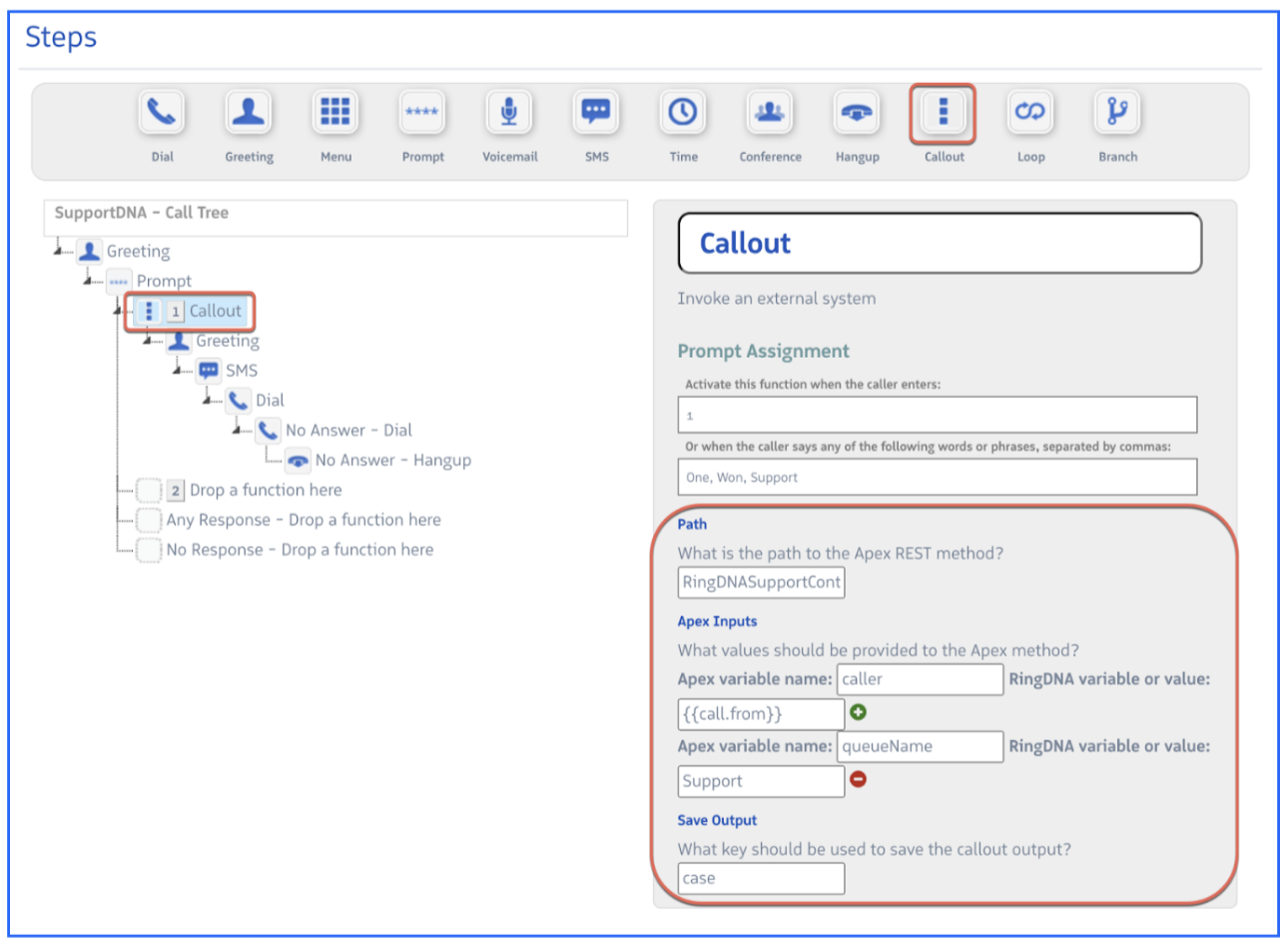
| Field | Description |
|---|---|
| Path | The URL path of the Apex REST class — must match the urlMapping in your @RestResource annotation (e.g., RingDNACaseCreate). |
| Apex Input | Key-value pairs passed to the Apex method as named parameters. Values can be hardcoded strings or call flow variables (e.g., {{call.from}}). Each key must match a parameter name in the method signature exactly. |
| Saved Output | The variable namespace for the response map. Use dot notation to reference individual keys in subsequent steps: {{outputName.keyName}}. |
Apex class requirements
Every Callout class follows the same structural pattern. Revenue.io calls it via @HttpPost and passes your Apex Input key-value pairs as named method parameters.
@RestResource(urlMapping='/YourClassName/*')
global class YourClassName {

    @HttpPost
    global static Map<String, String> yourMethod(String param1, String param2) {
        Map<String, String> response = new Map<String, String>();

        // Your logic here

        return response;
    }
}
Key requirements:
- The
urlMappingpath (without the leading/and trailing/*) is what you enter in the Callout step’s Path field. - The method must be
global staticand returnMap<String, String>. - Each Apex Input key you configure in the step must match a parameter name in the method signature exactly — including case.
- The method name can be anything; Revenue.io calls the
@HttpPostmethod on the class. - Every key you add to the
responsemap becomes available as{{savedOutput.keyName}}in subsequent steps.
call as your save output key — the call object is reserved and any custom values will not be evaluated.Example 1: Create a Case on every call
This class creates a new Salesforce Case for each inbound call, links it to the matching Contact and Account if found via SOSL, and returns the Case number for use in downstream steps.
Callout step configuration:
| Field | Value |
|---|---|
| Path | RingDNACaseCreate |
| Apex Input | caller = {{call.from}} |
| Apex Input | callKey = {{call.callKey}} |
| Apex Input | priority = High (or any valid Case Priority picklist value) |
| Apex Input | recTypeId = False (or a valid 15/18-character Salesforce Record Type ID) |
| Saved Output | newCase |
Apex class:
@RestResource(urlMapping='/RingDNACaseCreate/*')
global class RingDNACaseCreate {

    @HttpPost
    global static Map<String, String> createCase(String caller, String callKey, String priority, String recTypeId) {
        Map<String, String> response = new Map<String, String>();

        // Strip country prefix for SOSL phone search
        String cleanPhone = caller.deleteWhitespace().remove('+1').remove('+');

        // Find most-recently-created Contact matching this phone number
        List<List<SObject>> results = [FIND :cleanPhone IN PHONE FIELDS
            RETURNING Contact(Id, Email, AccountId ORDER BY CreatedDate DESC)];
        Contact con = ((Contact[])results[0]).size() > 0 ? ((Contact[])results[0])[0] : null;

        // Validate and apply Record Type if provided
        Boolean useRecType = String.isNotBlank(recTypeId)
            && !recTypeId.containsIgnoreCase('False')
            && !recTypeId.containsIgnoreCase('None');

        // Create the Case
        Case c = new Case(
            Status        = 'Open',
            Origin        = 'Phone',
            Subject       = 'Inbound Call - ' + cleanPhone,
            Description   = 'Inbound Call - ' + cleanPhone + ' - Call ID: ' + callKey,
            SuppliedPhone = cleanPhone,
            Priority      = priority,
            ContactId     = con != null ? con.Id : null,
            AccountId     = con != null ? con.AccountId : null
        );
        if (useRecType) c.RecordTypeId = recTypeId;
        insert c;

        c = [SELECT CaseNumber FROM Case WHERE Id = :c.Id];
        response.put('caseNumber', c.CaseNumber);
        return response;
    }
}
Using the output:
Reference {{newCase.caseNumber}} in any step that follows the Callout — for example, in an SMS step to send the caller their Case number:
“Your support case {{newCase.caseNumber}} has been created. An agent will be in touch shortly.”
Example 2: Look up an existing open Case
This class searches for an open Case matching the caller’s phone number. It returns whether a Case was found, and if so, its number, current status, and owner — enabling the flow to route the caller directly to the agent who already owns their Case.
Callout step configuration:
| Field | Value |
|---|---|
| Path | RingDNAAutoCaseLookup |
| Apex Input | caller = {{call.from}} |
| Saved Output | lookup |
Apex class:
@RestResource(urlMapping='/RingDNAAutoCaseLookup/*')
global class RingDNAAutoCaseLookup {

    @HttpPost
    global static Map<String, String> findAutoCase(String caller) {
        Map<String, String> response = new Map<String, String>();

        // Strip country prefix for SOSL phone search
        String cleanPhone = caller.remove('+1').remove('+').trim().deleteWhitespace();

        // Find most recent open Case with a matching SuppliedPhone
        List<List<SObject>> results = [FIND :cleanPhone IN PHONE FIELDS
            RETURNING Case(Id, OwnerId, CaseNumber, Status, SuppliedPhone
                WHERE IsClosed = false
                AND SuppliedPhone = :cleanPhone
                ORDER BY CreatedDate DESC LIMIT 1)];
        Case[] cases   = (Case[])results[0];
        Case caseFound = cases.size() > 0 ? cases[0] : null;

        if (caseFound != null) {
            response.put('caseExists', 'TRUE');
            response.put('caseNumber', caseFound.CaseNumber);
            response.put('caseOwner',  caseFound.OwnerId);
            response.put('caseStatus', caseFound.Status);
        } else {
            response.put('caseExists', 'FALSE');
        }

        return response;
    }
}
Using the output:
Place a Branch step after the Callout and evaluate {{lookup.caseExists}}:
- Branch value
TRUE→ Route to the case-owning agent using{{lookup.caseOwner}}in a Dial step set to PhoneNumber or by passing the ID to a second Callout. Optionally greet the caller with their Case number: “Welcome back. I’ll connect you to the agent handling Case {{lookup.caseNumber}}.” - Branch value
FALSE→ Route to a general support queue as normal.
See Call Flow Variables for full documentation on referencing Callout output in downstream steps.
Example 3: Priority queue routing by membership level
This example routes Gold and Platinum members to a dedicated priority queue using a single shared Apex endpoint called twice — first attempting to identify the caller automatically by phone, then falling back to a member number entered via Prompt.
Flow design:
- Callout 1 — Pass the caller’s phone number to
MemberLookup. If matched, return their membership level andidentified = TRUE. - Branch on
identified— IfTRUE, proceed directly to routing. IfFALSE, prompt for a member number. - Prompt — Ask the caller to enter their member number. Save the response as
memberNumber. - Callout 2 — Pass the entered member number to the same
MemberLookupendpoint. Return their membership level. - Branch on
memberLevel— RouteGoldandPlatinumto a priority queue; all others to the standard queue.
Because both callout steps use the same Saved Output name (memberLookup), the final Branch always evaluates {{memberLookup.memberLevel}} regardless of which path the call took.
The MemberLookup Apex class
One class handles both lookups. It checks whether memberNumber is populated — if so, it queries by member number; otherwise it searches by phone. Both paths return the same identified and memberLevel keys.
@RestResource(urlMapping='/MemberLookup/*')
global class MemberLookup {

    @HttpPost
    global static Map<String, String> findMember(String caller, String memberNumber) {
        Map<String, String> response = new Map<String, String>();

        Contact con = null;

        if (String.isNotBlank(memberNumber)) {
            // Called after Prompt — look up by member number
            List<Contact> contacts = [
                SELECT Membership_Level__c
                FROM Contact
                WHERE Member_Number__c = :memberNumber
                LIMIT 1
            ];
            if (!contacts.isEmpty()) con = contacts[0];
        } else {
            // Initial call — look up by phone number
            String cleanPhone = caller.deleteWhitespace().remove('+1').remove('+');
            List<List<SObject>> results = [FIND :cleanPhone IN PHONE FIELDS
                RETURNING Contact(Id, Membership_Level__c ORDER BY CreatedDate DESC LIMIT 1)];
            List<Contact> contacts = (List<Contact>)results[0];
            if (!contacts.isEmpty()) con = contacts[0];
        }

        if (con != null && String.isNotBlank(con.Membership_Level__c)) {
            response.put('identified', 'TRUE');
            response.put('memberLevel', con.Membership_Level__c);
        } else {
            response.put('identified', 'FALSE');
            response.put('memberLevel', 'Standard');
        }

        return response;
    }
}
Callout 1: Identify by phone
Step configuration:
| Field | Value |
|---|---|
| Path | MemberLookup |
| Apex Input | caller = {{call.from}} |
| Apex Input | memberNumber = (leave blank) |
| Saved Output | memberLookup |
After this step: Place a Branch step evaluating {{memberLookup.identified}}.
TRUE— Caller matched by phone. Skip to the final routing branch.FALSE— No match. Connect to a Prompt step.
Prompt: Collect member number
On the FALSE branch, place a Prompt step:
- Prompt audio: “We couldn’t find your account. Please enter your member number followed by the pound sign.”
- Save Response key:
memberNumber
Connect the Any Response path to Callout 2.
Callout 2: Identify by member number
Step configuration:
| Field | Value |
|---|---|
| Path | MemberLookup |
| Apex Input | caller = {{call.from}} |
| Apex Input | memberNumber = {{memberNumber}} |
| Saved Output | memberLookup |
The class receives a non-blank memberNumber and takes the SOQL branch instead of the SOSL phone search.
Final routing branch
Both paths end with the same Branch step evaluating {{memberLookup.memberLevel}}:
| Branch | Value | Destination |
|---|---|---|
| Priority members | Gold,Platinum | Dial → Priority queue |
| Everyone else | Any Value | Dial → Standard queue |
Membership_Level__c and Member_Number__c are custom Salesforce field API names used in this example. Replace them with the actual API names from your org. The membership level values (Gold, Platinum) must also match your picklist values exactly — Branch comparisons are case-sensitive.Example 4: Route to a specific agent by Salesforce User ID
Use this pattern when the agent responsible for a call cannot be determined from Salesforce record ownership alone — for example, when a custom field, territory assignment, or external system determines who should handle the call. The Callout retrieves the responsible agent’s Salesforce User ID and passes it to a Dial step for direct routing.
If the Salesforce UserID does not match a valid RingDNA user in your account, the Dial step is skipped and the caller proceeds to the next step in the Call Flow.
Callout step configuration:
| Field | Value |
|---|---|
| Path | AgentLookup |
| Saved Output | agentLookup |
Apex class:
@RestResource(urlMapping='/AgentLookup/*')
global class AgentLookup {

    @HttpPost
    global static Map<String, String> findAgent(String caller) {
        Map<String, String> response = new Map<String, String>();

        // Replace with your own ownership logic — territory lookup, custom field, external system, etc.
        response.put('userId', '005f1000002FAXnSAO');

        return response;
    }
}
The method returns a map with a userId key containing the agent’s Salesforce User ID. Replace the hardcoded value with whatever logic determines the correct agent in your org.
Dial step configuration:
After the Callout, add a Dial step and set the Dial ID field to {{agentLookup.userId}}.