Revenue.io Product Updates: October 2026
Automatic Participant Linking for Meeting Assistant Video Meetings
When you schedule a meeting, Revenue now reads your calendar invite before the call begins and pre-matches every invited participant to their Salesforce record by email - in the background, before anyone joins. This means that when participants join the meeting, Revenue already knows who to expect and can match them with much higher confidence. For example, if two contacts named “John Smith” exist across different accounts in Salesforce, Revenue now knows exactly which one was invited, eliminating the guesswork.
During the live meeting, Revenue matches participants by display name against the pre-matched invite list. If someone joins with a slightly different name - like “Mike” instead of “Michael Smith” - fuzzy matching will now recognize the connection and link them automatically.
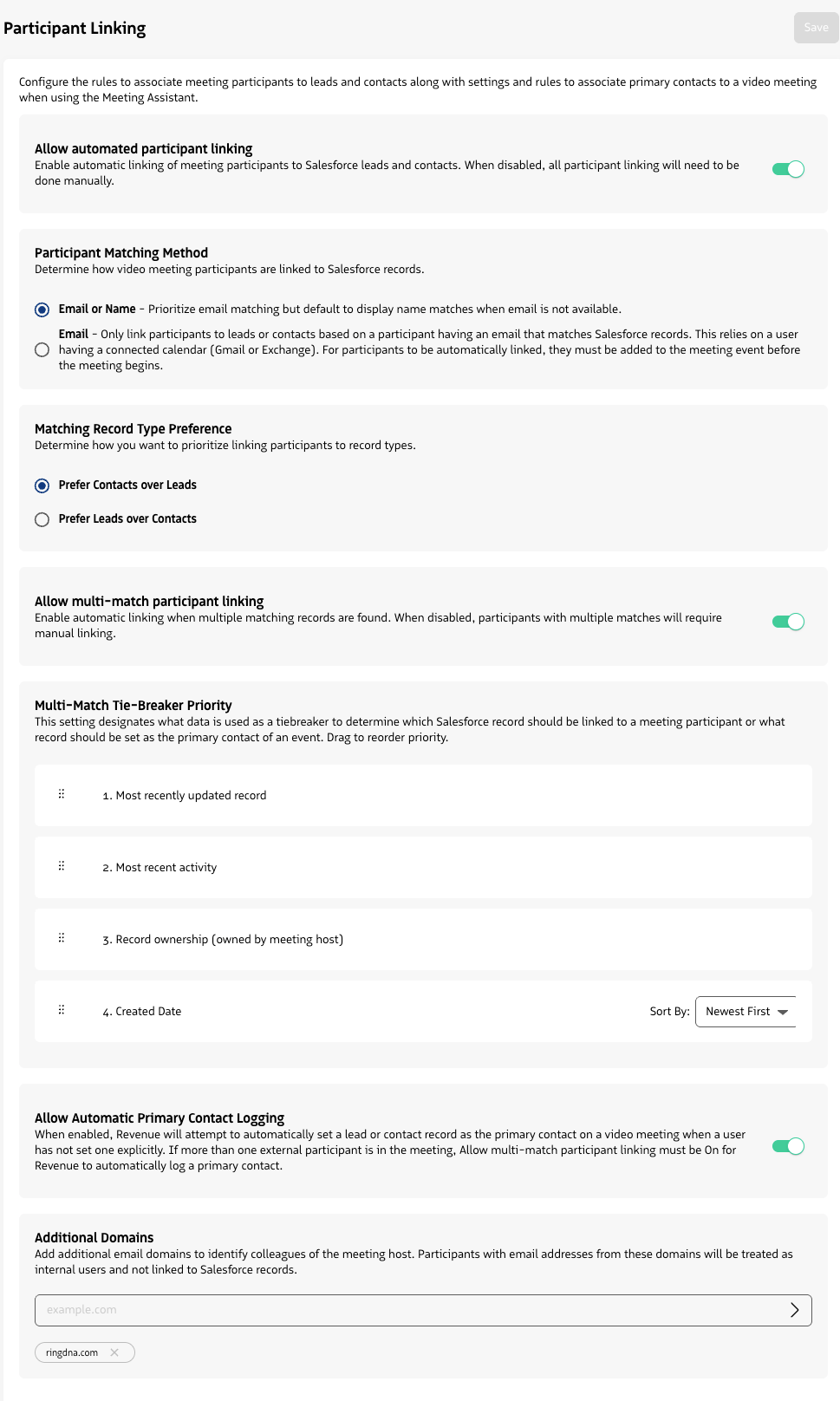
Admins have a new settings page with full control over how matching works - including record type preferences, internal domain filtering, and tie-breaker rules for multi-match scenarios.
The result is less manual linking for reps, better Salesforce data, and more reliable Scorecards tied to the right contacts.
Moments™ notifications and Scorecards are now eligible based on who was on the calendar invite and pre-matched to Salesforce - not just who was successfully matched during the live meeting. This means coaching coverage is no longer lost when a participant joins with an unexpected display name like “iPhone.” All other Moments™ and Scorecard targeting criteria still apply - this change expands who is eligible, not which Moments™ or Scorecards fire. The result is less manual linking for reps, better Salesforce data, more live coaching notifications, and more complete Scorecard coverage across your team.
Automatic participant linking is on by default for any account that has the Meeting Assistant enabled - no action required to get started. If needed, it can be turned off at any time under Admin -> Integrations -> Video Meetings -> Participant Linking.
Learn more about Participant Linking
Meeting Assistant for Zoom and Microsoft Teams
The Meeting Assistant is now available for Zoom and Microsoft Teams meetings. When enabled, the Meeting Assistant automatically joins scheduled Zoom or Microsoft Teams meetings where the user is the organizer and has a connected calendar - recording, transcribing, and analyzing the conversation for Conversation AI and real-time Moments™ coaching. Users can also manually invite the Meeting Assistant to any active Zoom or Microsoft Teams meeting at any time through the Moments™ application, even if auto-join is disabled or the meeting was not scheduled in advance.
Enabling the Meeting Assistant for Zoom or Microsoft Teams also unlocks automatic participant linking for meetings on those providers, which pre-matches invitees to Salesforce records by email before the meeting starts - giving your team more accurate contact attribution and primary contact logging without any manual effort.
If you’re currently using the native Microsoft Teams or Zoom integrations, reach out to our Support team to have the Meeting Assistant enabled for your account.