Sequence Lifecycle
A sequence moves through a defined lifecycle from creation through activation, deactivation, and, when appropriate, deletion. Lifecycle status determines whether the sequence can enroll participants, whether it can be edited or reactivated, and how it appears throughout Guided Selling.
Sequence lifecycle statuses
Guided Selling uses four sequence lifecycle statuses:
| Status | Description |
|---|---|
| Draft | The sequence is being created or reviewed and has not yet been activated. Draft sequences do not enroll participants. |
| Active | The sequence is available for participant enrollment. Manual sequences can accept eligible participants added by users, and Automatic sequences can enroll records that meet entrance criteria. |
| Inactive | The sequence has been deactivated. It no longer enrolls new participants or progresses sequences, and can be reviewed or reactivated later. |
| Deleted | The sequence has been safely retired. It is removed from normal sequence lists and selection workflows, cannot be reactivated, and is retained when historical data exists. |
Draft sequences
New sequences begin in Draft. Cloned sequences also open as editable drafts so admins can review and change their configuration before saving and activating them.
A Draft sequence has no participant history. If you delete a Draft sequence, it is permanently deleted rather than moved to Deleted.
Before activating a Draft sequence, review its:
- Activation type and priority
- Entrance and exit criteria
- Actions and action timing
- Automatic Email or SMS actions
- Delegation
- Repeatable and Slow Drip settings
Activating a sequence
Activating a sequence changes its lifecycle status to Active.
For Manual sequences, activation does not require a confirmation modal. Once active, eligible participants can be added manually.
For Automatic sequences, activation can begin associating records that already meet the entrance criteria.
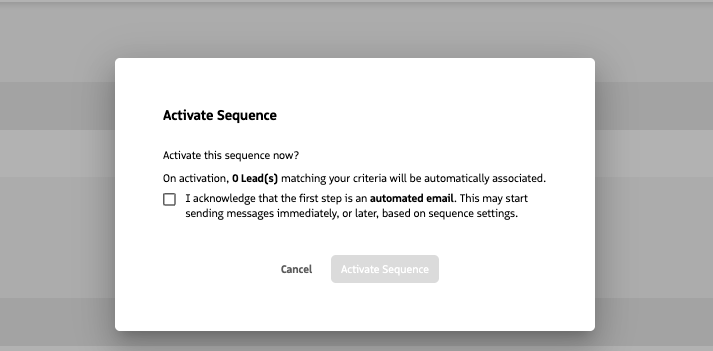
If an Automatic sequence starts with an automatic Email or SMS action, Guided Selling displays a contextual warning with the expected participant count. The admin must explicitly acknowledge that qualifying records may be associated immediately and that the first automatic action may send almost immediately after activation.
For more information, see Activation Types & Priority.
Activation in progress
Automatic sequence activation may take time when a large number of records qualify. While activation is processing, the sequence page can show activation progress as a percentage.
Guided Selling allows only one sequence activation process to run at a time. For additional details, see Automatic Activation Limits.
Deactivating and reactivating a sequence
Deactivating an Active sequence changes its lifecycle status to Inactive.
Use deactivation when you want to stop the sequence without retiring it permanently. An Inactive sequence remains available for review and can be reactivated later.
When you reactivate an Inactive sequence, review its current criteria, actions, timing, and automation configuration before proceeding. If it is an Automatic sequence with an automatic Email or SMS as the first action, the activation warning applies again when the configuration creates an immediate-send risk.
Deleting a sequence
Deletion behavior depends on the sequence lifecycle state.
Delete a Draft sequence
Deleting a Draft sequence is permanent. Because the sequence has never been activated, it has no participant history that needs to be retained.
Safely delete an Active or Inactive sequence
Deleting an Active or Inactive sequence uses Safe Delete.
Guided Selling:
- Exits any remaining participants with the exit reason Sequence Deleted.
- Changes the sequence lifecycle status to Deleted.
- Removes the sequence from the Sequences list and selection surfaces such as Add to Sequence.
- Preserves historical Sequence Association, task, and attribution data.
A Deleted sequence cannot be reactivated through Guided Selling.
Viewing a Deleted sequence
Deleted sequences are removed from normal working lists and cannot be selected for new enrollment. They may still be reachable from related historical records.
When a Deleted sequence is opened, it is read-only and displays a Deleted status or banner so users can distinguish historical configuration from an active sequence.
Deleted sequences cannot be restored or reactivated through the Guided Selling UI.
Sequence lifecycle and participant history
Sequence lifecycle and participant lifecycle are related but separate.
A sequence can remain Active while individual Sequence Associations become Completed as participants finish or exit. Deactivating or deleting a sequence does not erase historical participant records.
This separation allows reporting and attribution to continue even after a sequence is retired.
For instructions on editing, cloning, deactivating, and deleting sequences, see Edit, Clone, or Delete a Sequence.