Bulk Update Actions on Engage
Role:
Sequence Agent
License:
Guided Selling
Bulk update actions let you apply the same operation to multiple participant actions at once from the Engage view. This helps you manage high action volume faster and with fewer clicks.
Bulk Operations Available
From the Engage view, you can run these bulk operations on selected actions:
| Operation | Description |
|---|---|
Complete | Mark multiple task actions as completed. |
Send | Send multiple manual email actions. |
Skip | Skip multiple actions and advance participants of a specific action type. |
Reschedule | Set a new due date and time for multiple actions of a specific action type. |
Skip all | Skip all selected actions. |
Reschedule all | Reschedule all selected actions. |
Performing Bulk Updates
Select Actions
- Open the
Engageview. - Use the checkboxes to select multiple actions.
- You can select actions across different participants and sequences.
Choose a Bulk Operation
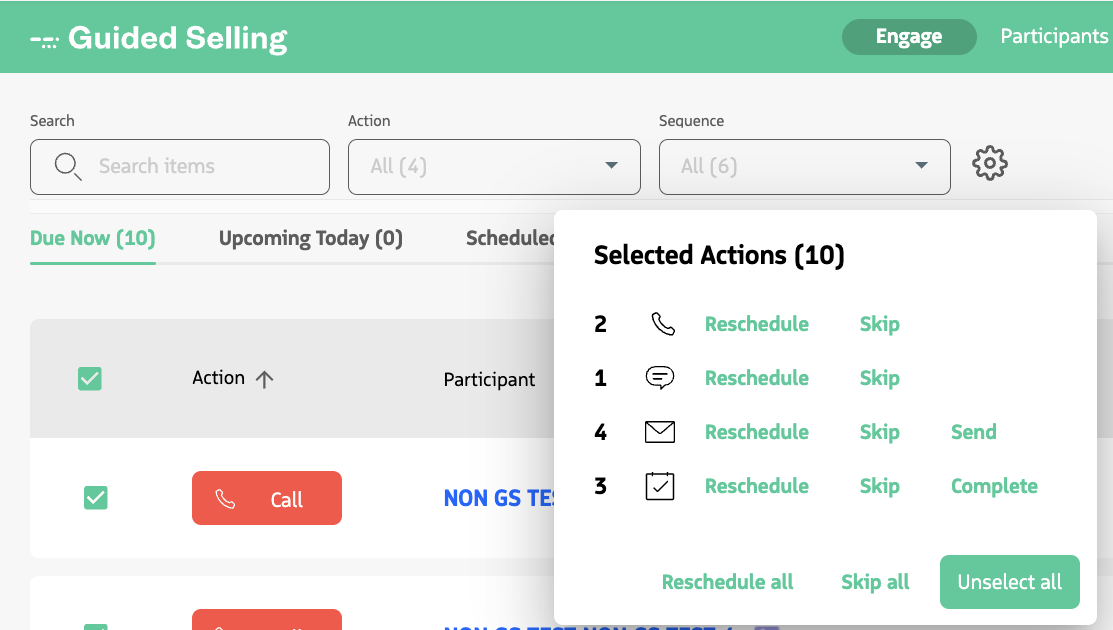
- After selecting actions, the bulk action menu opens automatically.
- Choose an operation: reschedule, skip, or send/complete by action type, or select:
Reschedule allSkip allUnselect all
Bulk Rescheduling Details
When you reschedule actions:
- Every selected action is updated to the same new date and time.
- Subsequent actions for affected participants are automatically recalculated to maintain the intended communication cadence.
- The
Original Due Datefield on the Participant Action record stores the system-calculated due date from before the reschedule.