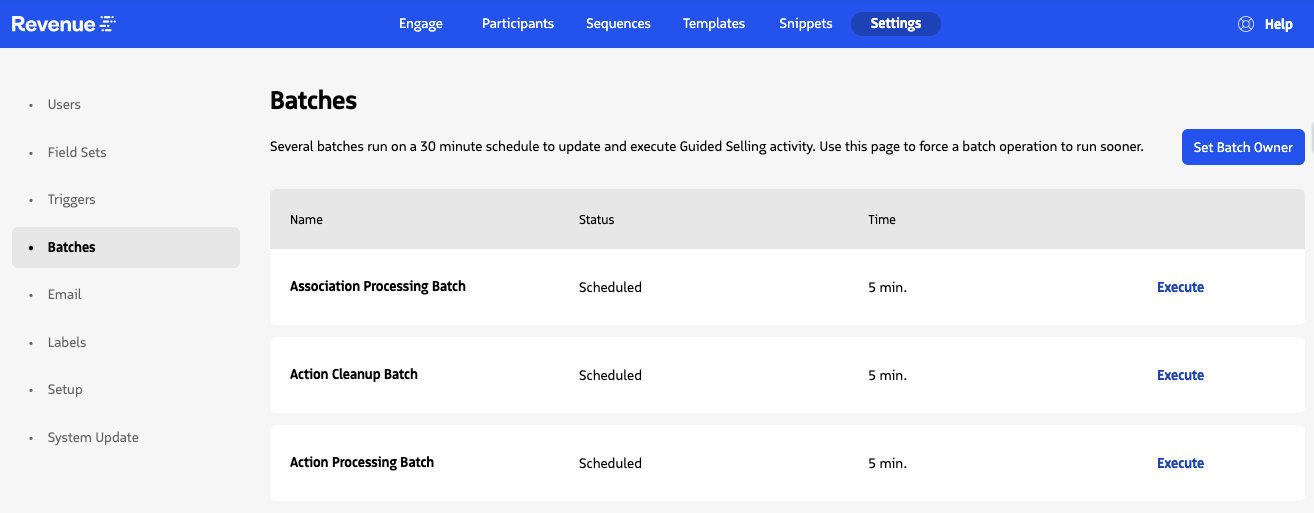
Batches
Guided Selling uses Apex batches to process sequence activity and participant state in the background.
The Batches settings page lets administrators review the current state of the primary Guided Selling processing jobs and manually start an eligible batch before its next scheduled run.
Batch Settings
On the Batches page, you can:
- Set the user who owns the Guided Selling batch operations.
- View each batch separately, including its current status and time until the next scheduled execution.
- Manually execute an eligible batch.
Set the Batch Owner
Click Set Batch Owner to make the current user the owner of Guided Selling batch operations.
The Batch Owner must have Modify All Data permission and the Sequence Admin permission set.
For additional setup information, see Batch Owner Setup.
View and run batches
The page lists the primary processing batches as separate jobs:
| Batch | Purpose |
|---|---|
| Action Processing Batch | Processes due Automatic Participant Actions. |
| Action Cleanup Batch | Performs housekeeping for due Manual Participant Actions, including criteria, opt-out, task, and supported delegation cleanup. |
| Association Processing Batch | Processes participant and Sequence Association state. In the normal scheduled processing flow, this batch is chained after Action Processing Batch. |
Each batch row includes:
- Name: The batch job name.
- Status: Displays Scheduled when the previous execution is complete and the batch is available for its next run, or Running while the batch is executing.
- Time: Shows the approximate number of minutes until the next execution when scheduled, or In Progress while running.
- Execute: Starts that specific batch manually when it is not already running.
The Execute control is disabled while the selected batch is running.
Action Processing Batch
Use Execute on the Action Processing Batch row to start processing eligible due Automatic actions before the next scheduled run.
In the normal scheduler flow, completion of Action Processing Batch is followed by Association Processing Batch.
Action Cleanup Batch
Use Execute on the Action Cleanup Batch row to start Manual-action housekeeping before the next scheduled run.
This batch is separate from Action Processing Batch and has its own status, next-run timing, and Execute control.
Association Processing Batch
Association Processing Batch is also displayed as a separate row and can be executed directly from this page.
During normal scheduled processing, however, it is chained after Action Processing Batch rather than independently launched by the scheduler.