Action Analytics
Role:
Sequence Admin
License:
Guided Selling
Action Analytics summarizes the performance of each Sequence Action in a sequence. Open a Sequence to compare how often each step is completed or skipped and, where supported, the outcome of the action.
The analytics are calculated from Participant Action records associated with each Sequence Action.
View Sequence Action Analytics
When you open a Sequence, the actions table displays these analytics for each Sequence Action:
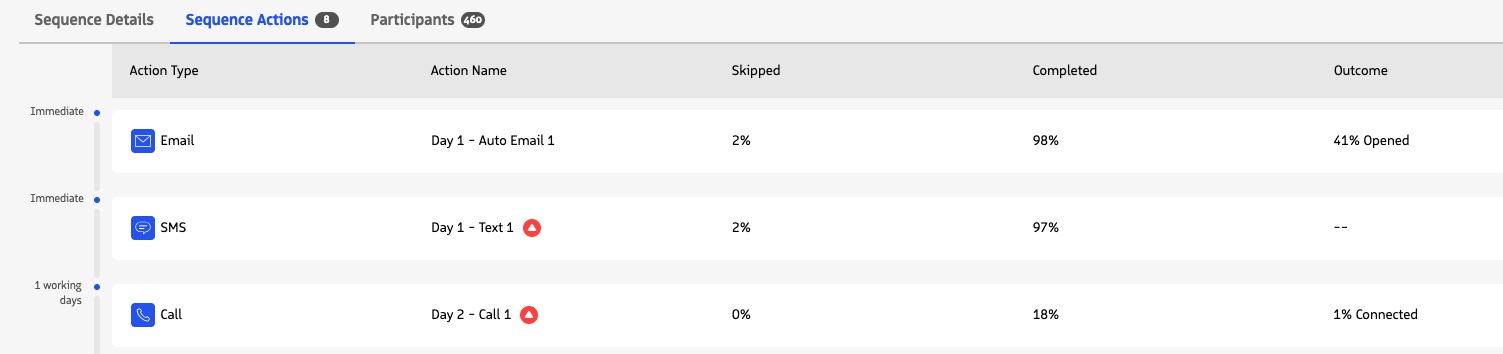
| Metric | What it shows |
|---|---|
| Skipped | The percentage of Participant Actions for the Sequence Action that have a Skipped action status. |
| Completed | The percentage of Participant Actions considered completed for the Sequence Action. For Email actions, this includes Participant Actions with an Initiated or Completed action status. For other action types, it includes Participant Actions with a Completed action status. |
| Outcome | An engagement outcome when one is available for the action type. Email shows the percentage of Participant Actions with an email-open signal. Call shows the percentage with a connected-call signal. SMS and Task actions do not currently display an outcome percentage. |
Percentages use all Participant Actions associated with that Sequence Action as the denominator.
How to use these metrics
Use Sequence Action Analytics to compare steps within a Sequence and identify where participants are progressing, being skipped, or generating engagement.
For example:
- A high Skipped percentage can indicate that action criteria or participant conditions are preventing that step from being performed.
- A low Completed percentage can help identify steps where participants are not progressing as expected.
- Outcome can provide an additional engagement signal for Email and Call actions.
Sequence Action Analytics summarize Participant Action records for the selected Sequence. They do not measure the difference between an action’s expected and actual execution time.